Workflows on Mistral: the X-Ray
X-Ray: this site, claim by claim
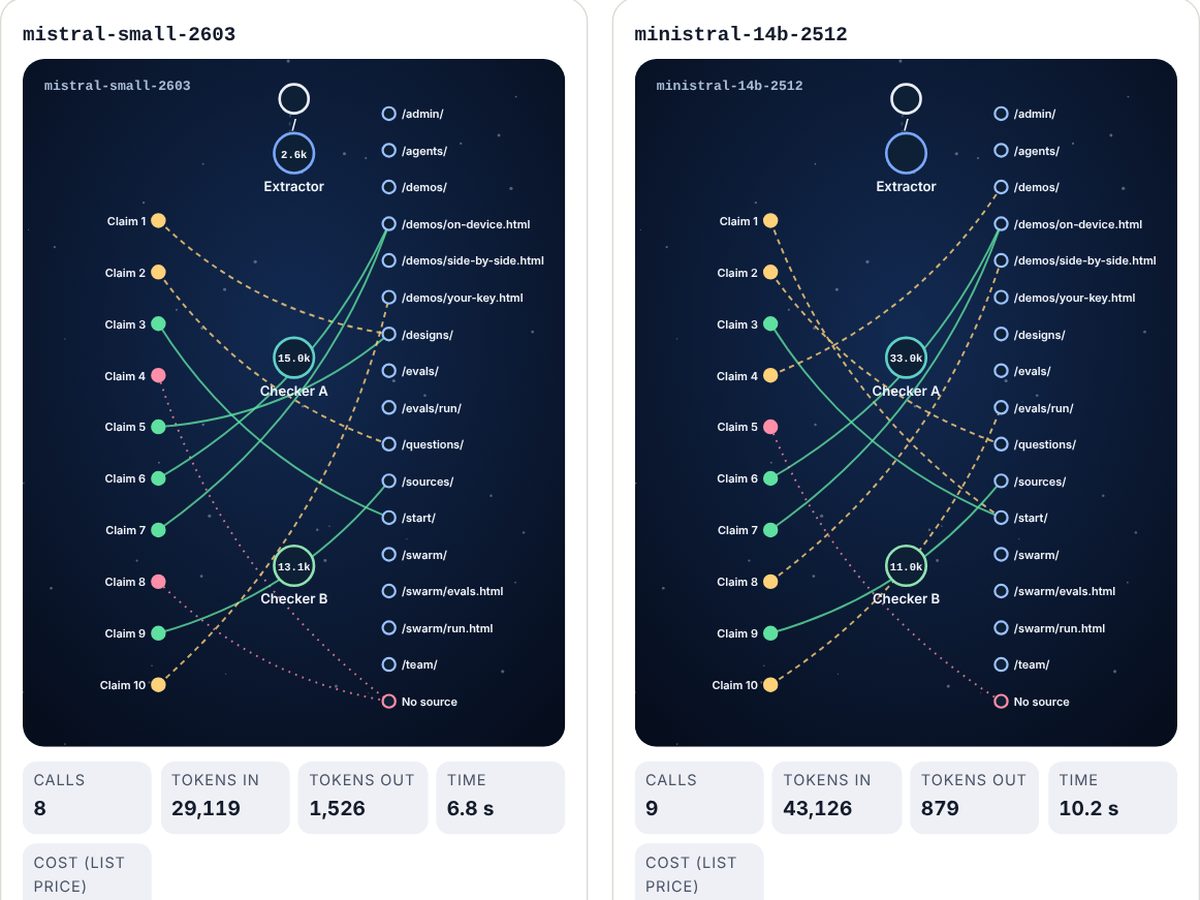
Pick a page of this site. An extractor on Mistral lists the facts it states, copied word for word. Then two checkers on each of two models look for another page of this site that says the same thing, and must quote it. Code, not a model, gives each claim its badge, and draws a line from the claim to its source.
The badges, decided in code
- CONFIRMED The checker's quote is found word for word on the page it names, that page is not the one being checked, the quote holds every number in the claim, and they share at least two words of four letters or more.
- WEAK SOURCE The quote is on that page, but lacks a number from the claim or shares too few words with it: read it yourself.
- NO SOURCE The checker found no other page, or its quote is not on the page it named.
- NOT ON THE PAGE The extractor's sentence is not on the page it was asked to read, so it is not checked.
The page being checked is out of the checkers' reach: their search leaves it out, and reading it is refused. A page cannot be its own source. A NO SOURCE badge means no other page of this site says it, not that it is wrong: many of this site's facts are cited on the sources page to Mistral's own pages.
What we found
One recorded run on the home page, 21 November 2026 at 03:20 UTC: claims listed by mistral-small-2603, then checked by mistral-small-2603 and ministral-14b-2512 at the same time, temperature 0.
- Of the same ten claims, Small 4's checkers confirmed 5, found weak sources for 3 and no source for 2; Ministral 14B's confirmed 4, weak 5, none 1. They agreed on 7 of the 10 badges.
- The extractor was told to leave out headings, and listed two anyway ("Hackathon / London", "Saturday 21 Nov 2026"). Both models found pages that mention them, and both got a weak badge.
- "The ledger asks five questions of any AI you depend on" was confirmed by Small 4 from /designs/ and found nowhere by Ministral 14B: the same fact, the same pages, a different answer.
- Before we put the page out of the checkers' reach, the two models cited the home page as its own source in 9 of their 20 verdicts (an earlier run, not kept). Before we let them page through long pages, they missed facts that sit deep in /sources/. Both were fixed in code, not in the prompt.
mistral-large-4, as the extractor, spent its whole 4,000-token budget reasoning in 43.6 s and listed no claim, so it is not offered as the extractor.
1. Replay the recorded run (no key needed)
The two X-Rays
Lane A: press Replay, or run it live below.
Lane B: press Replay, or run it live below.
2. Your Mistral key
Your key stays in this tab's memory and goes only to the Mistral endpoint you choose.
If your browser offers to save this key as a password, choose Never.
No key set.
Mistral's Free mode: what you send may be used to train Mistral's models unless you switch that off, so say nothing confidential.
Your key as a QR code
If you were given your key as a QR code: open its link on this device (the key comes after "#" in the link, and this page takes it from there), or paste or drop a picture of the QR code below. The picture is read here, in this tab, and sent nowhere.
Paste a picture of the QR code here (Ctrl+V, or Cmd+V on a Mac), or drop it here
What happens to a key from a QR code
Opened as a link: the browser never sends the part after "#" to any server, and this page removes it from the address bar and this tab's history the moment it loads. Your camera app or browser may still keep the link in its own history, so treat that link like the key itself, and revoke the key in your Mistral console after the event. As a picture: decoded with your browser's own QR reader or, where it has none, jsQR, a copy kept on this site. Either way the page asks you first whether to use it, because anyone can send a link with their own key in it; then the key goes into the key box above, held in this tab's memory only, and is never shown.
Where your key goes
It goes in the Authorization header, and only when you press a button that sends something to Mistral. It is never stored, never shown, never sent to this site, and gone when you close or reload the tab. Use a key with a spending limit.
On Mistral's free plan, what you send through the API may be used to train Mistral's models unless you switch that off in your Mistral admin panel (how to opt out, as read on 21 November 2026).
3. X-Ray a page, on your key
What this call sends, and to whom
Every call to Mistral made from this tab
| Time | To | Model | For | What was sent | Status | Time taken | Usage and cost |
|---|---|---|---|---|---|---|---|
| No calls yet. Nothing has been sent from this tab. | |||||||
Kept in memory in this tab only. Cost is an estimate from Mistral's published list prices (pricing, as read on 21 November 2026). Not an invoice.
How it works, and what it does not claim
- The workflow is xray.js, run unchanged by the recorder and by this page, over the visible text of this site's pages (17 pages, made on 21 November 2026). Newer pages are not in it yet.
- The badges are only as good as the rule above: a quote can share the words and numbers of a claim and still not support it. Every quote is shown, so you can judge.
- The view follows the X-Ray of the SGit-AI Web Summit stand (Angelo Leggio's graphs and live views, and the Galaxy by Silvio Switha's dashboard agent), redrawn in our own SVG.