
Workflows on Mistral: five brains
Five Mistral brains, one brief
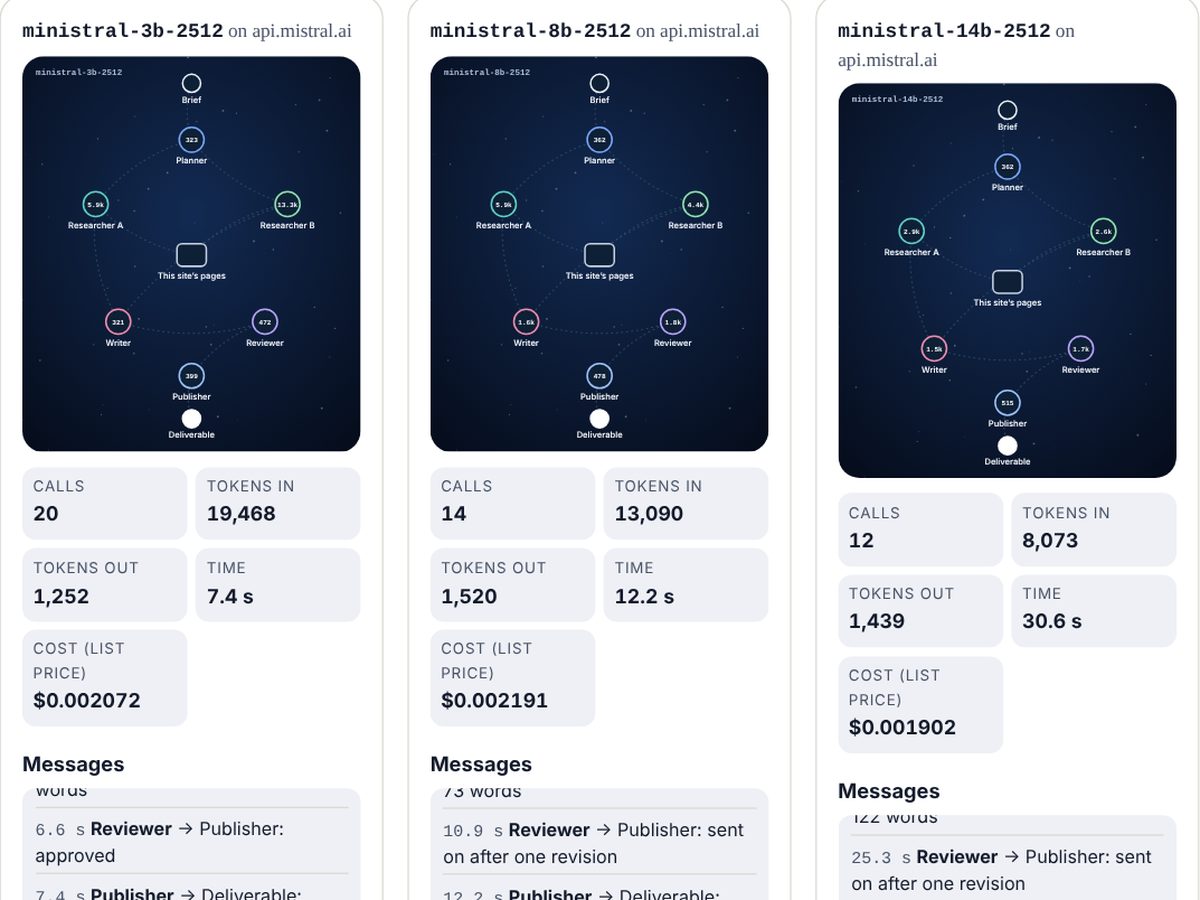
The relay's six agents, planner to publisher, run on five Mistral models at the same moment: the three Ministral 3 sizes, Mistral Small 4 and Mistral Large 4. Five galaxies side by side show who reads more, who is done first and who gets it right; the table and the checks say it in numbers.
What we found
One recorded run on api.mistral.ai, 21 November 2026 at 03:31 UTC, all five lanes started together, temperature 0.2, the relay's brief. One run: not a benchmark.
- Speed:
ministral-3b-2512published first, in 7.4 s, withmistral-small-26030.1 s behind;mistral-large-4took 127.1 s. - Cost: the four smaller models cost between $0.0019 and $0.0025 each at list price; Large 4 cost $0.108, more than forty times as much, for 110,153 tokens in and 14,821 out.
- Care: Large 4 made 58 tool calls on the site's pages, found all 4 of its quotes word for word, and cited all four. Ministral 3B found 1 of its 4 quotes on the pages it named and cited none, and its reviewer approved it at the first draft.
- Made-up addresses: Ministral 8B linked its pages on example.com. The off-site check also counts real addresses that are not this site, such as API endpoints: Small 4 gave one, Large 4 two (localhost for Ollama and api.mistral.ai). Read them in each lane.
- Ministral 14B made only 5 tool calls and cited no finding by number; its reviewer asked for a revision.
1. Replay the recorded run (no key needed)
The five lanes
Ministral 3 3B: press Replay, or run it live below.
Ministral 3 8B: press Replay, or run it live below.
Ministral 3 14B: press Replay, or run it live below.
Mistral Small 4: press Replay, or run it live below.
Mistral Large 4: press Replay, or run it live below.
The podium, computed
After a replay or a run.
2. Your Mistral key
Your key stays in this tab's memory and goes only to the Mistral endpoint you choose.
If your browser offers to save this key as a password, choose Never.
No key set.
Mistral's Free mode: what you send may be used to train Mistral's models unless you switch that off, so say nothing confidential.
Your key as a QR code
If you were given your key as a QR code: open its link on this device (the key comes after "#" in the link, and this page takes it from there), or paste or drop a picture of the QR code below. The picture is read here, in this tab, and sent nowhere.
Paste a picture of the QR code here (Ctrl+V, or Cmd+V on a Mac), or drop it here
What happens to a key from a QR code
Opened as a link: the browser never sends the part after "#" to any server, and this page removes it from the address bar and this tab's history the moment it loads. Your camera app or browser may still keep the link in its own history, so treat that link like the key itself, and revoke the key in your Mistral console after the event. As a picture: decoded with your browser's own QR reader or, where it has none, jsQR, a copy kept on this site. Either way the page asks you first whether to use it, because anyone can send a link with their own key in it; then the key goes into the key box above, held in this tab's memory only, and is never shown.
Where your key goes
It goes in the Authorization header, and only when you press a button that sends something to Mistral. It is never stored, never shown, never sent to this site, and gone when you close or reload the tab. Use a key with a spending limit.
On Mistral's free plan, what you send through the API may be used to train Mistral's models unless you switch that off in your Mistral admin panel (how to opt out, as read on 21 November 2026).
3. Run it live, on your key
What this call sends, and to whom
What a run costs on your key: each lane stops at 30 calls, so five lanes can make up to 150. Our recorded run made 78 calls and cost about $0.12 at list price, $0.11 of it Large 4; untick Large 4 and it is about one US cent.
Every call to Mistral made from this tab
| Time | To | Model | For | What was sent | Status | Time taken | Usage and cost |
|---|---|---|---|---|---|---|---|
| No calls yet. Nothing has been sent from this tab. | |||||||
Kept in memory in this tab only. Cost is an estimate from Mistral's published list prices (pricing, as read on 21 November 2026). Not an invoice.
How it works
- The same relay.js as the relay, five times at once; its checks are explained there. The lanes are lanes.js and the drawing flow.js, after the SGit-AI Web Summit stand's views by Angelo Leggio and the Galaxy by Silvio Switha's dashboard agent.
- Prices are Mistral's list prices (pricing, as read on 21 November 2026).